LLM Settings
This chapter covers configuring the language model providers and parameters the solution will use.
Supported Providers
| Provider | Korean | Type | Notes |
|---|---|---|---|
| OpenAI | OpenAI | Cloud | API key required |
| Anthropic | Anthropic | Cloud | Claude family, API key required |
| Google Gemini | Google Gemini | Cloud | API key required |
| AWS Bedrock | AWS Bedrock | Cloud | AWS credentials required |
| vLLM | vLLM | Self-hosted | Models deployed on internal GPU servers |
| SGLang | SGLang | Self-hosted | Models deployed on internal GPU servers |
Recommended for closed-network environments (e.g., financial sector)
In segregated network environments or under data-egress-restricted policies, the use of external cloud-based LLMs may be restricted.
In such cases we recommend prioritizing on-premise inference infrastructure (vLLM, SGLang, and similar).
Registering a Provider
Select Admin → Environment → LLM in the left sidebar.
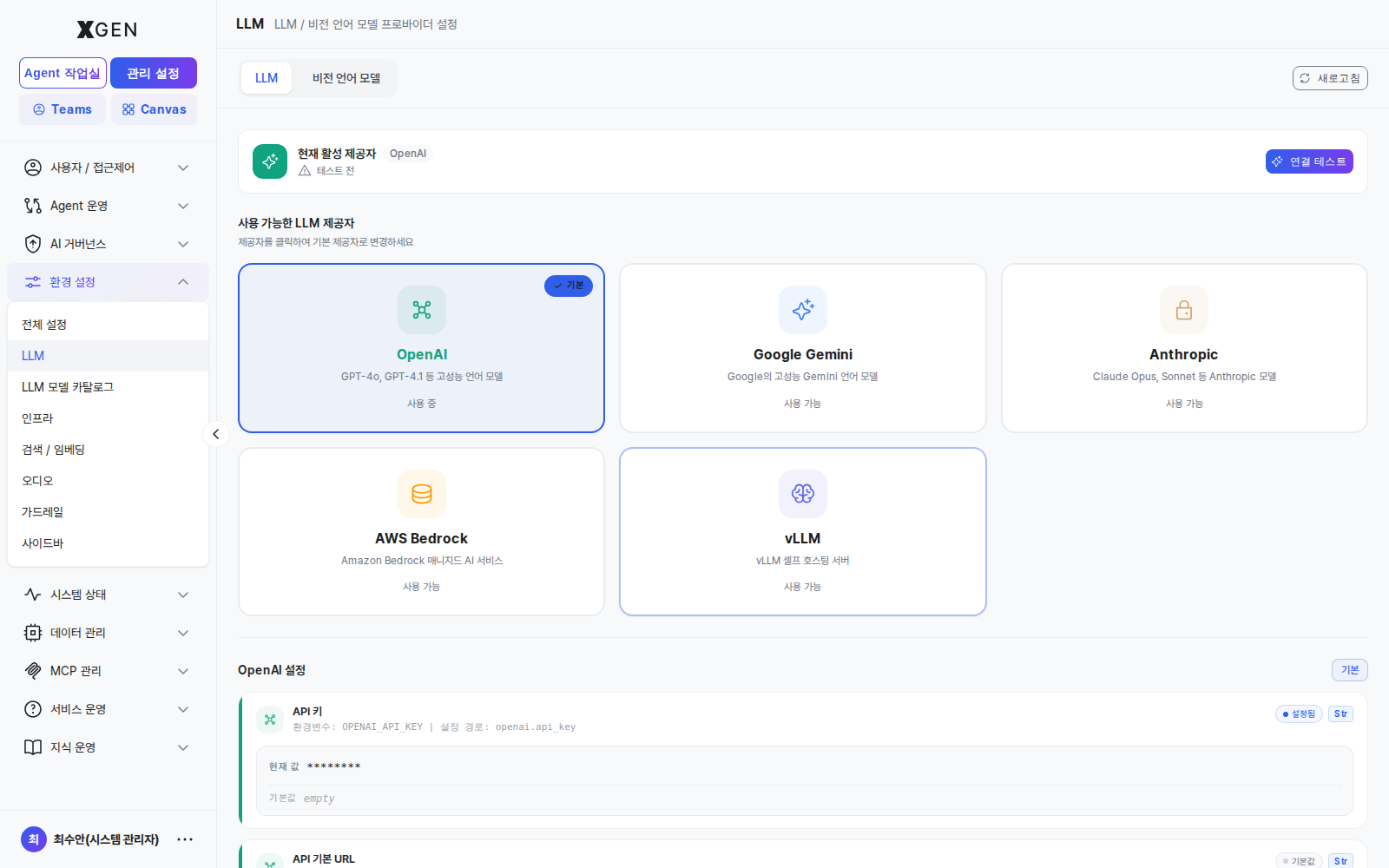
- Click the Connect button on the provider card
- Enter:
- API Key (or token): The credential issued from the provider console
- Endpoint (for self-hosted): in the form
https://vllm.internal.example.com - Default Model: The default model for this provider
- Click Test Connection → verify response
- Save
API Key Security
Once saved, the API key is no longer displayed on screen. If lost, you must reissue it in the provider console. Changes may briefly fail in-flight calls — schedule during low-traffic hours.
Setting the Default Provider
When multiple providers are registered, designate the system-wide default.
- Select from the Default Provider dropdown at the top of LLM Settings
- Save
Newly created agents and agentflows will use the default provider. Individual items can override with another provider.
Model Parameters
| Parameter | Korean | Meaning | Suggested |
|---|---|---|---|
| Temperature | Temperature | Response randomness. 0 = deterministic; higher = more creative | Factual: 0.2 / Creative: 0.7 |
| Max Tokens | Max Tokens | Maximum tokens per response | General chat: 1000–2000 |
| Top P | Top P | Nucleus sampling — diversity control | 0.9–1.0 |
| Stream | 스트리밍 | Stream response in real time | true (better UX) |
Operational Impact of Changes
Operational Impact
Changing the LLM provider or default model has the following effects:
- In-flight chats: Started chats finish on the existing model; the new model applies from the next message.
- Deployed agentflows: Use the new model immediately. Response quality, cost, and latency may shift.
- Evaluation results: Past evaluations are model-specific. Re-evaluate with the new model.
Check the audit log for impact scope before changes, and prefer low-traffic hours.
Operational Recommendations
- Quarterly review — Check whether providers have released new models, evaluate, and upgrade.
- Cost monitoring — Track monthly costs separately when using cloud providers. Sudden spikes may signal abnormal calls (loops, etc.).
- Failover — If possible, register a primary and a secondary provider for automatic fallback during outages.
Contact
For questions about LLM settings, please contact the Xgen Solution Administrator.