Agent Planning
This chapter covers the screen where users record idea-stage proposals for new agents — "we should automate this task" before building anything. The Agent Creation → Agent Planning menu (top of the Agent Creation section) in the left sidebar is in scope.
This screen is the step before building an agent. For the canvas-based build process, see Creating an Agent. For running and operating an agent, see Agent Operations.
Accessing the Screen and Creating a New Plan
Select Agent Creation → Agent Planning in the left sidebar; the list of existing Agent Development Plans is shown. Click + New Plan at the top right of the list to open the Agent Development Plan authoring modal.
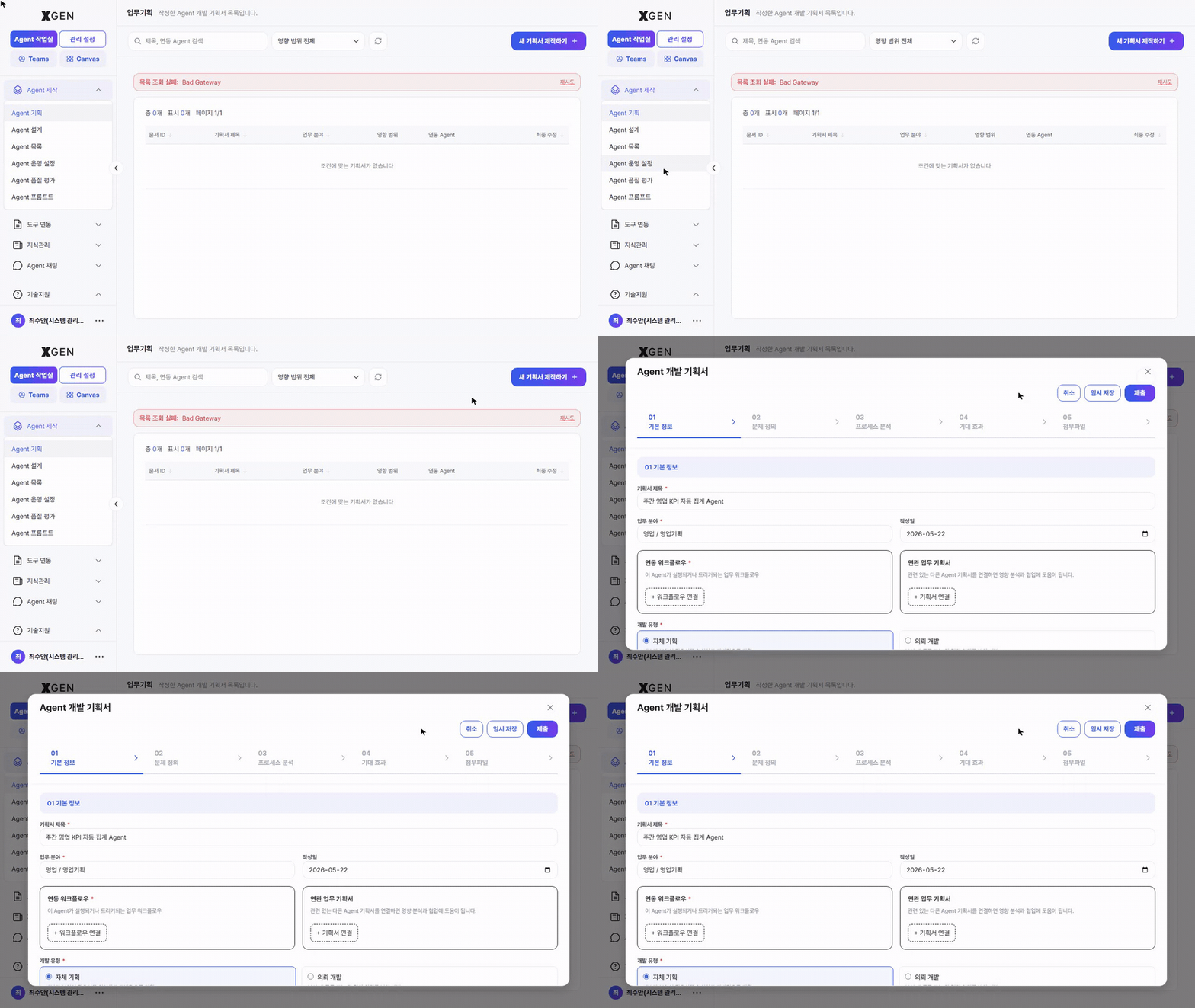
List Layout
| Region | Content |
|---|---|
| Top | Screen title "업무기획 (Task Planning)" with the description "List of agent development plans you have written." |
| Search / filters | Search by title or linked agent; Impact scope filter (All / Org-wide / My team / Self) |
| Top right | + New Plan — open the new-plan authoring modal |
| Body table | Document ID · Plan title · Work area · Impact scope · Linked agent · Last modified |
Authoring Modal — 5 Steps
The new plan is authored as a stepped modal. The top of the modal shows 5 step indicators; the top-right buttons are Cancel / Save Draft / Submit.
| Step | Fields |
|---|---|
| 01 Basic Info | Plan title, Work area, Date, Related workflow, Related plans, Development type (In-house / Outsourced) |
| 02 Problem Definition | Current state of the target task and the problem to solve |
| 03 Process Analysis | I/O definition, step-by-step processing, external system integration |
| 04 Expected Impact | Quantitative/qualitative outcomes, KPIs, before/after changes |
| 05 Attachments | Reference materials (specs, sample data, etc.) |
Save Draft lets you close mid-write and resume later. Submit finalizes all steps and registers the plan in the list.
Basic Info — Field Detail
| Field | Description |
|---|---|
| Plan title | A one-liner stating what the agent automates (e.g., "Weekly Sales-KPI Auto-aggregation Agent") |
| Work area | Sales / Sales Planning / Strategy / Customer Service / Compliance / Risk / Credit, etc. |
| Impact scope | Org-wide / My team / Self — drives collaboration and approval routing |
| Related workflow | An existing agentflow this plan extends (optional) |
| Related plans | Other related plans — helps with impact analysis and collaboration |
| Development type | In-house (you build it in the canvas) / Outsourced (request from the dev team) |
Recommended Flow
- Write the plan first — Putting the idea in writing before opening the canvas speeds up node design.
- Tag related workflows and plans — If similar items exist, link them to avoid duplicate work or to reference them.
- Pick the right impact scope — "Org-wide" raises governance-review priority. For personal use, keep it on "Self".
- Save draft between steps — If completing all 5 steps in one sitting feels heavy, use Save Draft and resume later.
Related Chapters
- Creating an Agent — Plan → canvas step (actual node assembly)
- Agent Operations — Running, deploying, and sharing the built agent
- AI Governance — Risk assessment and approval flow for "Org-wide" plans (Governance Officer screen)
Contact
For Agent Planning screen questions, please contact the Xgen Solution Administrator.