Guardrail Model Setup
This chapter covers calling an external Guard model (e.g., Qwen3Guard-Gen vLLM). The policies themselves (PII patterns, forbidden words, risk levels) live in the AI Control Policy screen — see PII Protection Policy. This chapter is only about the model endpoint that evaluates those policies.
Accessing the Screen
Select Admin → Environment → Guardrail in the left sidebar.
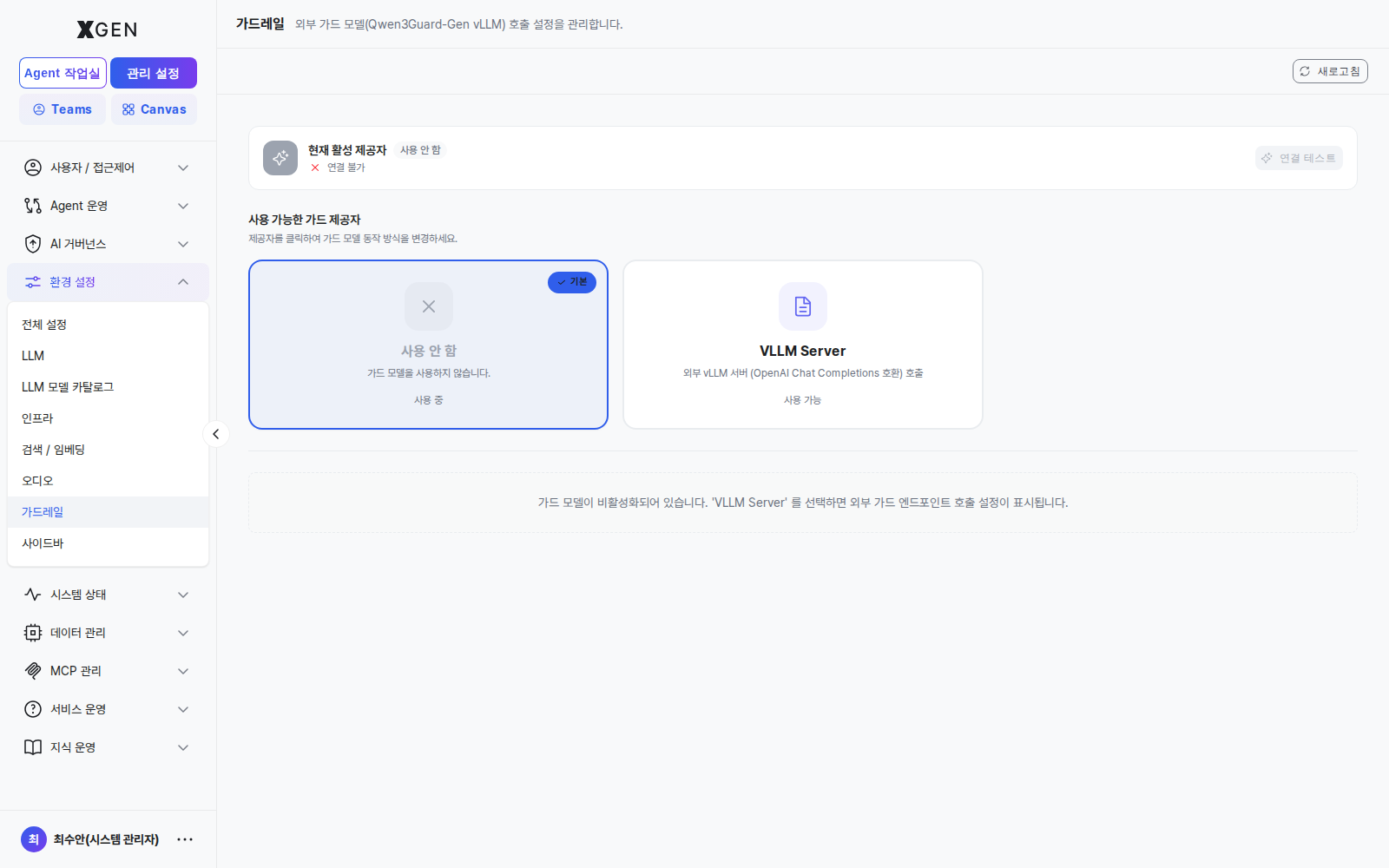
The screen has two regions.
| Region | Content |
|---|---|
| Top — Current active provider | Which guard provider is in use and the connection state (✓ connected / ✕ unreachable). Reset / Connection Test buttons on the right. |
| Body — Available guard providers | Cards listing the selectable providers. Click a card to switch the active provider. |
Provider Options
| Provider | Description | Connection fields |
|---|---|---|
| None (사용 안 함) | Guard model is not called — policy matching runs regex-only | — |
| VLLM Server | Calls an external vLLM server (OpenAI Chat Completions–compatible API), e.g., Qwen3Guard-Gen | Endpoint URL, API key, Model name (revealed when selected) |
The default is None.
Enabling the VLLM Server
- Click the VLLM Server card → the input form appears.
- Fill in:
- Endpoint URL: e.g.,
https://guard.internal.example.com/v1 - Model name: e.g.,
Qwen3Guard-Gen - API key: auth token (optional but recommended in production)
- Timeout / max tokens etc. (optional)
- Endpoint URL: e.g.,
- Click Connection Test at the top right — a 200 response confirms connectivity.
- Click Save — the card switches to
사용 중 (in use)and the "Current active provider" row updates.
Reset required after edits
The yellow banner "설정 수정 후 반드시 초기화가 필요합니다 (Reset required after changes)" means the guard-call pipeline cache must be invalidated. After switching to a new endpoint, click Reset once to flush the cache; otherwise some requests may still route to the previous model for a short period.
Behavior When the Guard Model Is Disabled
- In the "None" state the body shows the message "가드 모델이 비활성화되어 있습니다. 'VLLM Server' 를 선택하면 외부 가드 엔드포인트 호출 설정이 표시됩니다."
- Regex-based detection and masking from PII Protection Policy still works normally.
- However, subtle PII that is hard to capture with regex (e.g., addresses written as free text) and semantic-level forbidden content (e.g., intent-based slurs) cannot be detected without a guard model. In regulated industries, enabling VLLM Server is recommended.
Operational Recommendations
- Prefer an internal-network endpoint — Guard calls touch both user input and LLM responses; do not point at a publicly exposed endpoint.
- Use a short timeout — A slow Guard model directly inflates user-facing latency. Recommend ≤ 1 second.
- Decide failure-mode behavior — When the Guard call fails, decide explicitly between "allow (fail-open)" and "block (fail-closed)". Recommended for finance: block.
- Quarterly model review — Check the Guard model's accuracy (false positives / negatives) once per quarter and swap models if needed.
Related Chapters
- PII Protection Policy — regex-based PII / forbidden-word policy definitions (always active, independent of the Guard model)
- LLM Settings — generation-LLM provider registration (separate from the Guard model)
Contact
For guardrail-model questions, please contact the Xgen Solution Administrator.